
How to vet an influencer before a sponsorship
To vet an influencer on X before a sponsorship, decide who you need to reach, scan the influencer’s followers with Revealed, and check four things: whether their roles and interests match your customers, whether their locations match your markets, how much of their audience you already reach, and whether there are clusters of low-quality bios. Do this before you agree a rate, not after.
The answer in full
Vetting an influencer before a sponsorship comes down to one question: does this creator reach the people you want to sell to? Start by writing down the roles, interests and markets that matter to your campaign. Then scan each shortlisted creator's followers with Revealed and measure the share of their audience that matches, rather than the raw follower count. Check where followers are based against your launch markets, and compare each creator with your own account to see how many relevant people they would add that you do not already reach. Revealed's Audience quality view and its copy-pasted bio highlights show how much of the audience looks low quality, which is a prompt to ask questions or adjust the price. Export the audience as a spreadsheet so the decision can be reviewed later. Once a creator passes this audience check, ask them directly for recent post performance and past sponsor results, because Revealed shows who follows them, not what the audience does with a sponsored post.
Step by step
- 01
Write down who you need to reach
Name the roles, interests and markets you are paying for, for example founders in the UK and Germany. Without this, every audience looks fine.
- 02
Scan each shortlisted creator
Scan the followers of every creator on your shortlist with Revealed so you are comparing like with like. Scans are free and unlimited, so there is no cost to checking more than one.
- 03
Score audience fit
Use bio signals to see how many followers match your target roles and interests. Note the share, not just the absolute number.
- 04
Score location fit
Use Geography to see how many followers are in your launch markets. A strong audience in the wrong country does not help a country-specific offer.
- 05
Measure new reach
Compare each creator with your own account. The creator who reaches the most relevant people you do not already have is usually the better buy.
- 06
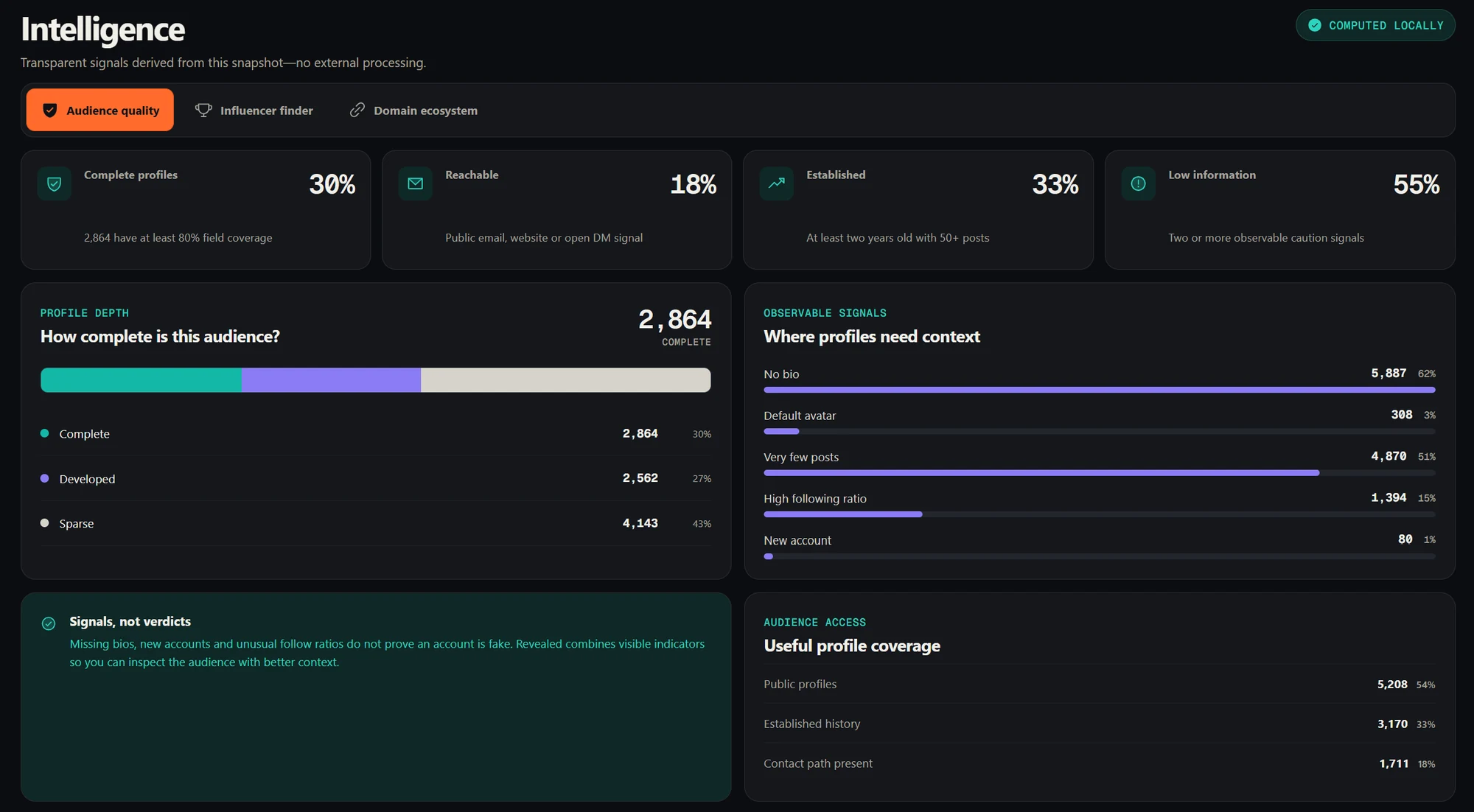
Check audience quality (Pro)
Open Audience quality, a Pro view, and note the share of followers with caution signals such as no bio, a default avatar or very few posts, plus any copy-pasted bio cluster. A high share is a reason to ask the creator questions or adjust the price, not proof of wrongdoing.
- 07
Keep the evidence
Export the audience as a spreadsheet so the decision can be reviewed later or shared with a client.
What to ask the creator once the audience checks out
Audience fit is only one part of vetting. Once a creator passes it, ask for recent post performance, previous sponsor results and usage terms. Revealed tells you who is in the audience, and the creator or the platform has to tell you what that audience does with a sponsored post.
Why vetting on audience beats vetting on size
Sponsorship budgets are spent against a customer, not a follower count. A creator with a smaller, well-matched audience can reach more of the people you want than a larger creator whose followers are spread across unrelated interests and regions.
What to keep in mind
- Revealed checks audience composition. It does not measure post engagement, conversion or a creator’s reliability.
- Bio-derived roles, interests and locations are self-reported and incomplete by nature.
Common questions
01What should I check before paying an influencer on X?
Check who follows them (roles, interests and locations against your customer profile), how much of their audience you already reach, and whether there are clusters of low-quality bios. Then check their recent post performance and past sponsor results directly with the creator.
02Can I compare several influencers at once?
Revealed compares two audiences side by side. To rank a shortlist, compare each creator against your own account and note how many new, relevant people each one adds.
03Is Revealed free for this?
Scanning, the overview, the profile explorer, search and CSV export are free. Bio signals, geography and audience comparison are Pro features.
04Does Revealed upload the followers I scan?
No. Scans run in your own browser and the audience data (profiles, bios, analytics and exports) stays in Chrome extension storage on your device. Revealed’s servers only handle your account, plan and billing.