
X follower analytics: where it went and how to see who your followers are
X analytics and follower analysis answer different questions. Start at X's account analytics page for the native dashboard; our check on 9 October 2026 showed a Premium access prompt. To understand the people in a follower list, review the profiles themselves and separate self-reported bios and locations from platform metrics or inferred demographics.
What X analytics still shows, and where to find it
For X (formerly Twitter), start with the current account analytics page while signed in. In our 9 October check, x.com/i/account_analytics displayed a Premium upgrade prompt for advanced analytics. We did not subscribe or inspect the dashboard behind that prompt. Treat the access requirement shown for your own account as the current instruction, rather than follow an old screenshot that promises a free dashboard.
X's official analytics help describes post and video activity, including how dashboard totals, post lists and CSV reporting use different date scopes. These are useful when your question is about content performance. That same help page describes an ads analytics access route, so it does not settle the entitlement of every newer account analytics view.
For any chart, read the metric, period and population before using it. A post impression is not a unique follower. An engagement is not a purchase. People who see an advertisement, people who view a post and people who follow your account can be different groups. A strong report says which group its numbers describe.
Where did Twitter analytics go?
Twitter analytics has not simply disappeared: the current X account analytics route presents a product and access prompt. Start there instead of assuming the old analytics.twitter.com address or an older menu layout will behave as it did when a tutorial was written. If you are working in X Ads, follow its separate campaign reporting route.
The sources we checked do not establish one reliable date for every dashboard change. We have therefore avoided a removal timeline and a blanket claim that X no longer provides demographics. X's advertising documentation describes audience insights by demographic and targeting categories. That is not proof that the same fields are available in your account-level follower view.
If a tutorial says to open an Audiences tab, compare its date and screenshots with your live account. If a feature is gated, decide whether it answers your question before paying. You may need post performance, a continuous follower history or a list of people to inspect; those are three different purchases.
What “follower analytics” actually means
Name the job first. A tool can provide excellent post reports while being the wrong choice for understanding the people in a specific follower list.
| Job | Evidence to look for | Limit to remember |
|---|---|---|
| Growth over time | Dated follower counts or consistently collected snapshots | A larger later scan can reflect better collection coverage. |
| Demographics | A documented population and method for age, gender, language or location | Inferred attributes are estimates; ad audiences are not automatically followers. |
| Roles, interests and topics | The bios and profile fields in the collected follower list | Self-description does not establish reading habits or buying intent. |
| Quality and influence | Explainable profile signals and relevant account context | A sparse profile is not proof of a bot; reach is not engagement. |
Growth over time
A follower count tells you audience size at one moment. A growth report needs repeated observations on a consistent basis. If you manually compare two scans, record their dates, status and coverage. Do not turn a difference between partial lists into a claim about who followed or unfollowed.
Audience demographics
Ask whether a demographic chart describes followers, viewers, advertising recipients or a modelled audience. X explains that some advertising age and gender targeting uses inference when people have not supplied information. An estimate can help plan a campaign, but it should not become a factual label attached to a person.
Roles and interests from profile content
A bio that mentions engineering is evidence of self-description. Read surrounding words before grouping it with every other engineering mention: someone could be a student, a recruiter or a company account. Keep ambiguous and missing bios visible in your notes instead of silently assigning everyone to a role.
Audience quality and influential followers
Use observable signals to decide where to look more closely. Verification, follower count, account history and profile completeness can supply context. None proves a person is influential in your market or that an audience is fraudulent. Inspect relevant profiles and compare the creator's actual content results before making a sponsorship decision.
How to see who your followers are, step by step
There are three practical routes. A manual review helps with a handful of profiles; a browser scan makes a chosen list searchable; a hosted tool can suit ongoing reporting. Collection coverage and the vendor's data flow matter whichever route you choose.
Method 1: scan a chosen follower list in your browser
Sign in to X in Chrome and choose your account or another public account you can access. In Revealed, click the button beside a profile's follower count or enter the handle. Confirm you are scanning followers rather than following: the first describes who follows the account; the second describes who it follows.
Review the collected profiles as they arrive. You can pause, resume or stop; check the scan status and received count before interpreting the audience. Free includes the overview, profile explorer, text search and raw CSV export. Pro adds grouped bio language, geography, influential-profile views and two-audience comparison. There is no product scan cap, but X access and rate limits can still prevent a complete list.
Method 2: use a hosted analytics tool
Fedica says its X follower analysis covers demographics, personas and account changes after you connect an account. Circleboom describes follower metadata and management features. Minter.io describes daily follower changes, post performance and scheduled reports. These are their product descriptions, not accuracy benchmarks from our tests.
Check the current plan, the population it reports on and whether it supports your own account or another account. Read its privacy policy and connection permissions. A hosted reporting service and a local browser scan have different data flows; neither label alone tells you everything about retention, access or later sharing.
Method 3: inspect a small set of profiles by hand
Open the follower list on X, read a few bios and follow relevant profile links. This is enough when you want context about a small shortlist. It is a weak way to estimate an entire audience: the entries you happen to see may not represent everyone. We have not established a universal 50-profile viewing cap, so do not build your method around that number.
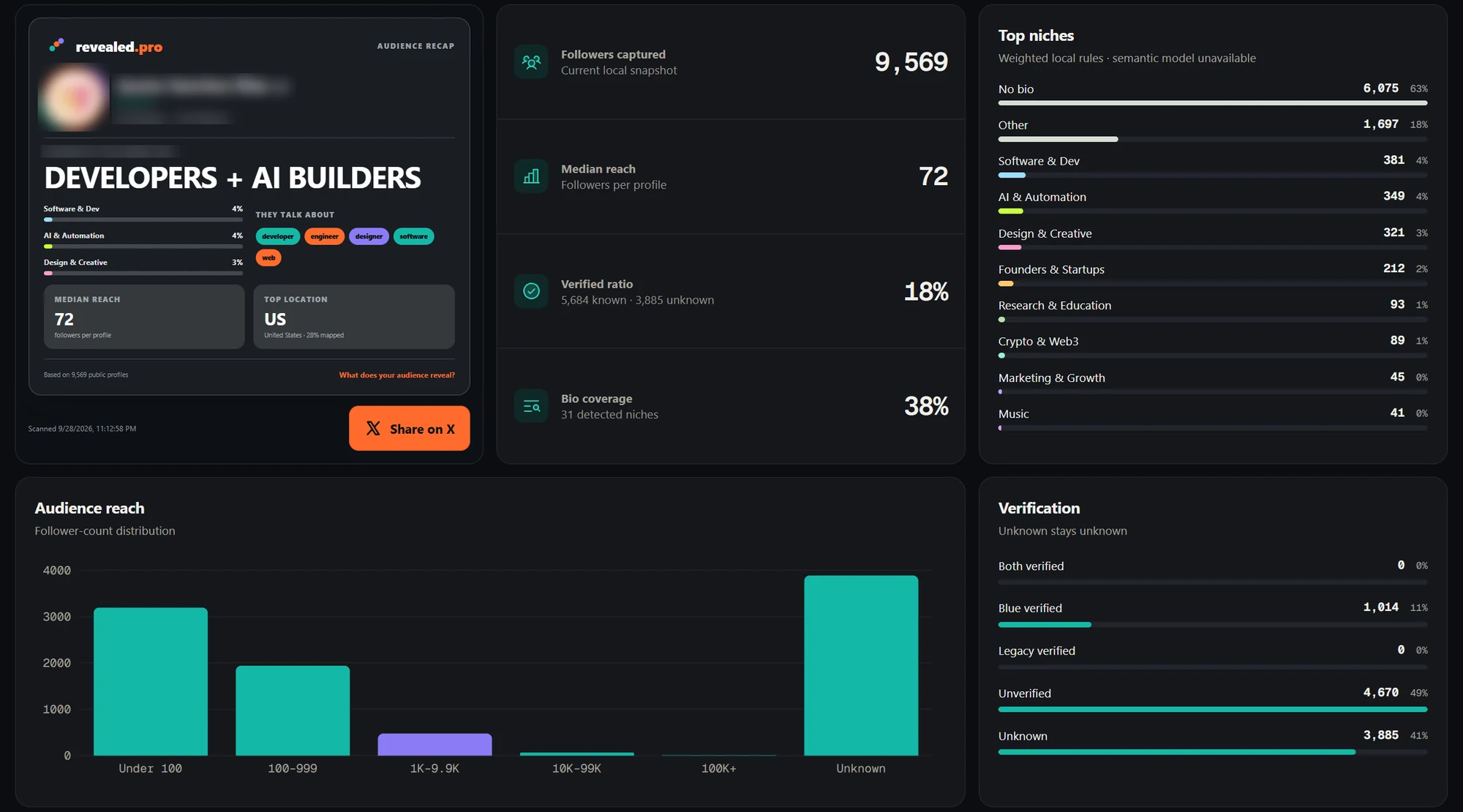
What you can learn from a follower scan
Start with roles and recurring language. The follower bio research guide explains how to inspect examples behind a theme. On Pro, Bio signals helps surface the language people use, but a common word can have several meanings. Treat a theme as a hypothesis for content or positioning, then test it using actual response data.
Next, look at geography. The follower location guide works with locations people put on their profiles. A blank field, a joke or an ambiguous place name remains a limitation. A country share among mapped profiles should not be described as a share of every follower unless the denominator really is every follower.
For influence, review profiles that fit the topic rather than simply take the largest follower counts. For overlap, use the audience overlap guide to compare two collected audiences on Pro. Shared profiles show a relationship between the collected lists, not a person's motive for following either account.
Revealed's reviewed release does not estimate age or gender and does not collect your private post performance. It can compare saved snapshots, but it is not a continuous follower-growth or unfollower service. Keep these limits in the report, especially when stakeholders use the word analytics to mean everything at once.
A 10-minute research review you can repeat
Use this as a review of an available scan, not a promise that collection finishes in ten minutes. Choose one question, such as whether your audience includes the roles your next campaign needs. The example is illustrative and uses no invented audience totals.
- 01
Record the evidence
Write down the account, scan date, collected count and status. If the scan is partial, put that beside the findings.
- 02
Inspect role language
Search a role on Free or inspect grouped bio terms on Pro. Read example profiles to check the meaning before naming a segment.
- 03
Check the target market
On Pro, inspect self-reported locations and note missing or unmapped values. Keep your target region beside the evidence.
- 04
Review possible partners
Inspect relevant influential profiles rather than choose solely by reach. Check their recent content yourself.
- 05
Keep a dated record
Export a CSV and save your question, findings and limitations separately. Use comparable coverage if you repeat the exercise later.
Which option fits your question?
For how your own content performs, begin with X's available post and account reporting. For continuous growth history and scheduled reports, inspect a service that specifically documents those features, such as Minter.io or Fedica. Confirm its current plan and connection requirements before choosing it.
For the people in a particular accessible X list, a browser-based scan such as Revealed is a focused option. If you only need a spreadsheet, read the free exporter comparison. If you only need context about a few profiles, manual review may answer the question without a new tool. Choose by the evidence you need to produce, rather than a general best-tool label.
Privacy: what happens to the data
Revealed's publisher-described design stores audience profiles and analyses them locally in Chrome. The 0.11.4 release includes a bundled classification model. Account pairing and plan checks use online services; local analysis does not mean there are no network requests.
Exports and integrations are separate sharing choices. A CSV contains public personal data, and uploading it gives the destination a copy. The optional Pro assistant bridge returns bounded summaries, which can include the researched account handle and dates. A cloud assistant may process those summaries remotely even though the bridge runs on your computer. Read the privacy-first guide and apply the extension safety checklist to any tool, including ours.
What to keep in mind
- Native dashboard access was checked, but metrics behind the Premium prompt were not inspected.
- A follower scan describes collected, accessible profiles and may be partial.
- Self-reported or inferred attributes are not verified facts about individuals.
- Manual snapshot comparison is different from continuous growth tracking.
Common questions
01Did Twitter remove analytics?
A current X account analytics route still exists. Our check on 9 October 2026 showed a Premium access prompt. Older links, tutorials and advertising dashboards can describe different interfaces. We could not establish a single reliable removal timeline and do not claim that all analytics or demographic reporting disappeared.
02Where do I find my X analytics?
Open x.com/i/account_analytics while signed in and follow the access instructions shown for your account. Our current check displayed an upgrade prompt. X Ads has separate campaign reporting and help pages. Check which population and date range a view describes before treating it as follower analytics.
03Can I see who my followers are on X?
You can inspect follower profiles your signed-in account can access. A scan makes the collected list searchable and can help summarise bio language and self-reported locations. Check coverage before describing the result as your full audience, and remember that a follow does not establish interest in buying.
04Can I see my followers' age and gender?
Revealed does not estimate these attributes. X documents demographic insights in advertising contexts, and some other vendors advertise demographic estimates. Check whether a report describes followers or a different population and how its estimates are produced. Do not assume a profile scan verifies a person's age or gender.
05Is there a free way to analyse my X followers?
Manual profile review is one option. Revealed Free includes local scans, the overview, profile explorer, search and raw CSV export without a Revealed account. Deeper bio signals, geography and audience comparison are Pro features. No product scan cap does not guarantee X will return every follower.
06Can I analyse someone else's followers?
You can research lists available to your signed-in X session, including accessible public accounts. Revealed does not bypass protected-account restrictions. Record the collection date and coverage, distinguish followers from following, and describe bio and location findings as self-reported information rather than verified demographic facts.
07Does Revealed send scanned followers to its account service?
The reviewed release stores and analyses audience rows locally. Account pairing and plan access still involve online services. If you export a file or connect an assistant, that creates a separate sharing boundary. The assistant bridge supplies summaries rather than raw rows, but your assistant provider's policies still apply.
Sources and further reading
X account analytics
Direct access check showed a Premium upgrade prompt. We did not inspect a subscribed dashboard or verify every metric available inside it. Reviewed 9 October 2026.
X: post activity and analytics access
Official help describes post/video metrics and the ads analytics context; it should not be read as confirmation that every current analytics surface is free. Reviewed 9 October 2026.
X: advertising demographics and audience insights
Documents campaign audience insights and inferred targeting demographics, rather than a profile-by-profile follower export. Reviewed 9 October 2026.
Fedica: X follower analysis
Vendor describes demographic/persona analysis, account connection and growth reporting. Feature descriptions are vendor claims, not independently tested accuracy. Reviewed 9 October 2026.
Circleboom: follower analysis
Vendor describes follower metadata, characteristics and account-management features. Reviewed 9 October 2026.
Minter.io: X analytics
Vendor describes follower growth, post performance and scheduled reports. Reviewed 9 October 2026.
Revealed: privacy and product boundaries
Checked against the public 0.11.4 release package; source inspection, not an independent security audit. Reviewed 9 October 2026.
Try a follower scan in Revealed
Install Revealed from the Chrome Web Store. Free includes local scans, profile search and raw CSV export; you can add Pro when you need deeper audience analysis.